
Salesforce Summer ’25 Release brings significant improvements across the platform, especially in how teams combine AI-powered user experiences with backend logic. Two main tools now drive Salesforce’s AI automation capabilities: Prompt Builder and Apex.
Prompt Builder has evolved into a powerful, low-code interface builder for Einstein Copilot, while Apex remains critical for executing secure, scalable automation under the hood.
With Einstein Copilot now customizable using Prompt Builder and Apex Actions, many teams are asking, When should you use Prompt Builder, and when is Apex still the better choice?
So, this blog breaks down the key differences, use cases, and technical roles of both tools. We’ll also walk through how Prompt Builder fits into the new Copilot framework and where Apex continues to lead in performance and flexibility.
Prompt Builder in Summer ’25: What’s New
Prompt Builder lets you design AI-powered prompts for Einstein Copilot, the new conversational interface in Salesforce.
With the Summer ’25 release, Prompt Builder now supports:
- Dynamic prompts grounded in Salesforce or external data
- Input variables passed into prompt templates
- Actions that trigger Flows, Apex, or standard Copilot actions
- Preview pane to test responses side-by-side while editing
You can access it under:
Setup → Einstein Copilot → Prompt Builder
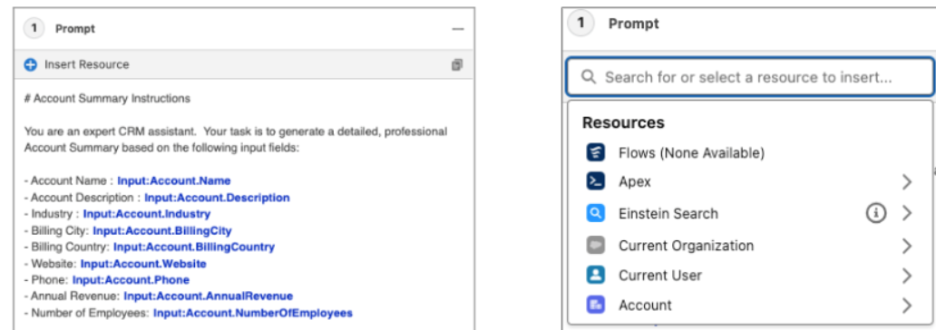
- Prompt Builder in Summer ’25, showing grounded input fields and available Copilot resources such as Apex, Flow, and CRM data.
Connecting Prompt Builder to Apex or Flow
Prompt Templates are only one part of the setup. For the prompt to do something, you need to define an action, either an autolaunched Flow or an Apex method exposed via Copilot Skills.
To link Prompt Builder to Apex:
- Create your Apex class with the @InvocableMethod annotation
- Go to Copilot → Skills in Setup
- Register the class as a custom skill
- Connect that skill to your Prompt Template via an action mapping
This enables a full AI-to-logic flow:
- Copilot → Prompt → Action → Apex Execution.
When to Use Prompt Builder
Prompt Builder is ideal when:
- You’re building natural-language responses inside Copilot
- The goal is to surface insights or summaries from CRM data
- You need non-code automation triggered by user queries
- You want to iterate quickly with versioned, testable templates
Prompt Builder now supports multimodal inputs, too, like files and images, and can be grounded in external objects, making it much more powerful than earlier releases.
When to Use Apex
Apex still plays a central role in:
- Running complex logic that Prompt Builder can’t handle
- Executing DML operations, validation, or cross-object updates
- Triggering external API calls or using Named Credentials
- Implementing batch jobs, schedulers, or triggered logic
Even when using Prompt Builder, Apex is often needed behind the scenes to carry out the actual business action triggered by the AI.
Prompt Builder vs Apex: Side-by-Side Comparison
| Use Case | Prompt Builder | Apex |
| Build Copilot user experiences (UI prompts) | ✅ Yes | ✅ (via action) |
| Generate AI responses from CRM/external data | ✅ Yes | ❌ Not directly |
| Execute complex business logic or integrations | ❌ | ✅ Fully supported |
| Trigger DML or validation across multiple objects | ❌ | ✅ Yes |
| Scheduled jobs, queueables, platform events | ❌ | ✅ Yes |
| Handle file/image input in prompt interaction | ✅ Yes | ❌ Not applicable |
| AI prompt testing and preview | ✅ Yes | ❌ Not applicable |
Conclusion
Salesforce Summer ’25 draws a clear line between where Prompt Builder fits and where Apex still leads. Prompt Builder now handles intelligent, user-facing interactions via Copilot, while Apex continues to power secure, complex backend logic.
Used right, they complement each other. Prompt Builder drives the AI experience, and Apex ensures it runs with control and precision.
If you’re building Copilot skills, integrating Prompt Builder with Apex actions, or looking to roll out AI automation that actually works in production, Synexc can help.
Book a free discovery call to get practical, implementation-ready support!!
About the Author
Sambhav Arora is a 7X Certified Salesforce Consultant and CEO at Synexc, helping organizations unlock practical value from Salesforce with scalable, production-ready AI strategies.